User Profile
Your account page is the central place to view your profile, track your progress, and manage your account settings. It shows everything from your rank and balances to your passive income stats and multiplier progression.
Access your account by tapping your avatar/profile picture in the top-left corner of the main screen.
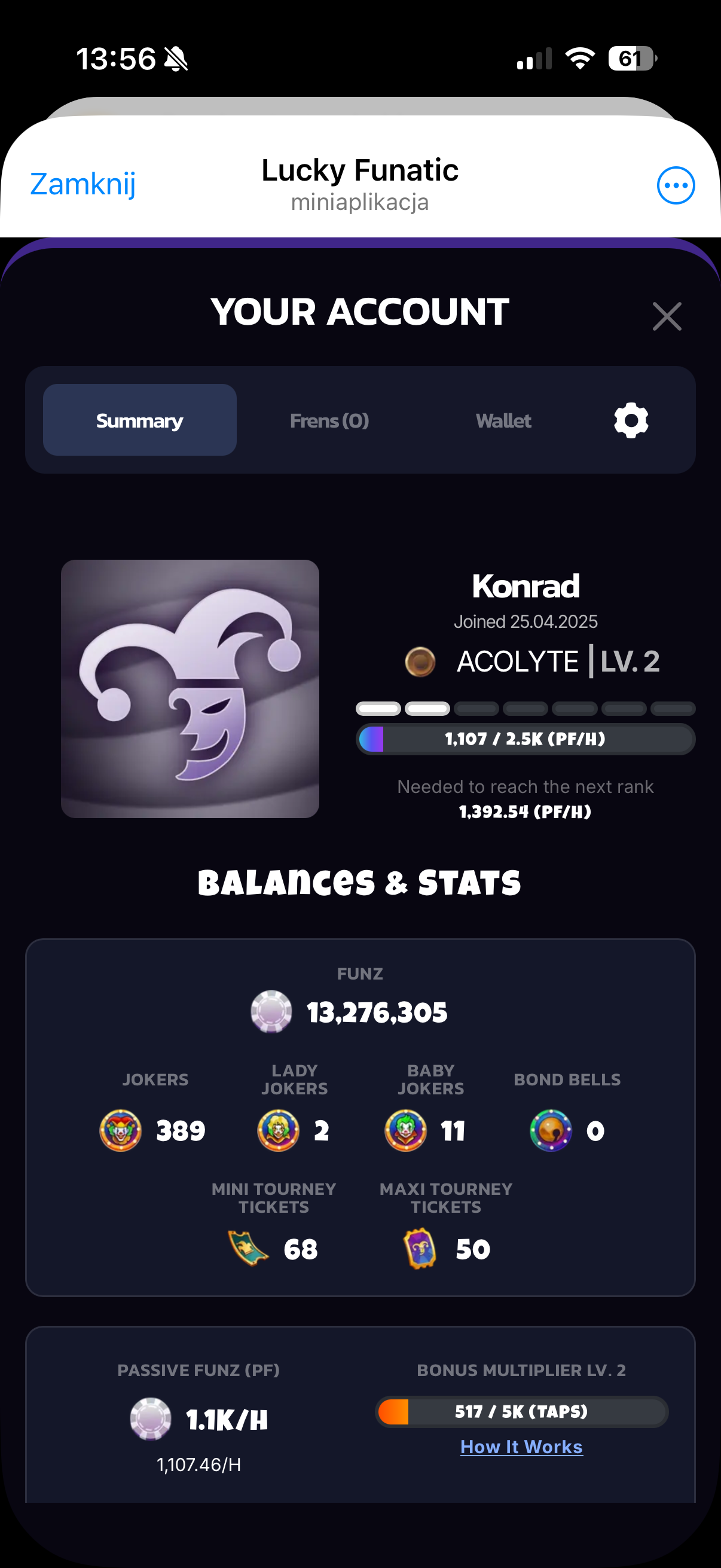
Profile Summary
At the top of the account page you'll see your player card:
- Username -- your Telegram display name
- Join Date -- when you first opened Lucky Funatic (e.g. "Joined 25.04.2025")
- Rank -- your current rank and level (e.g. "Acolyte | Lv. 2"). Ranks are earned through total taps and reflect your overall engagement
- Rank Progress Bar -- shows your Passive Funz per Hour (PF/H) progress toward the current rank tier's maximum (e.g. "1,107 / 2.5K (PF/H)")
Your rank is a visible indicator of how far you've progressed in the game. It's displayed next to your name throughout the app and gives other players a sense of your experience level.
Balances & Stats
Below the profile card is a complete breakdown of all your currencies. This is the definitive view of everything you own:
| Currency | Description |
|---|---|
| Funz | Your primary currency balance -- the big number at the top |
| Jokers | Premium currency earned from tapping (0.05% drop), quests, and conversions |
| Lady Jokers | Premium currency, can be converted to Funz via Inventory |
| Baby Jokers | Premium currency, can be converted to Funz via Inventory |
| Bond Bells | Earned by inviting friends (1:1), spent on permanent boosters |
| Mini Tourney Tickets | Entry tickets for Mini Rumble tournaments |
| Maxi Tourney Tickets | Entry tickets for Maxi Rumble tournaments |
Passive Funz & Bonus Multiplier
At the bottom of the stats section you'll find two important metrics that drive your idle income:
- Passive Funz (PF) -- your total passive income per hour, generated by all your Story cards combined. Shown as both the hourly rate (e.g. "1.1K/H") and the exact number below it (e.g. "1,107.46/H")
- Bonus Multiplier -- your current multiplier level (e.g. "Lv. 2"), which is a percentage boost applied to all passive income. The orange progress bar shows your tap count toward the next level (e.g. "517 / 5K (TAPS)")
These two stats work together: your Story cards determine your base PF/H, and the Bonus Multiplier scales it up. The more you tap, the higher your multiplier goes, making all your passive income more valuable over time.
flowchart LR
    Cards["Story Cards\n(base PF/H)"] --> Multiply["x Bonus Multiplier\n(from tapping)"]
    Multiply --> Total["Effective PF/H"]
    Total --> Income["Passive Funz\nEarned Over Time"]
Tapping the "How It Works" link next to the Bonus Multiplier gives you a detailed breakdown of the multiplier system and how tapping increases it.
Tabs
The account screen has four tabs for managing different aspects of your profile:
- Summary -- the main stats view described above
- Frens -- your list of invited friends, with a button to invite more. Shows how many friends you've brought in and how many Bond Bells you've earned
- Wallet -- TON wallet connection screen (see Wallet)
- Settings (gear icon) -- account settings and preferences